
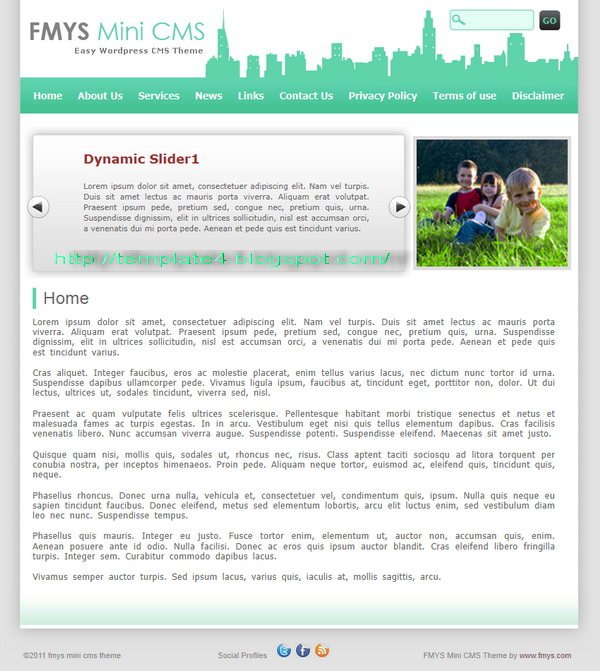
| Name: | FMYS Mini CMS |
| Platform: | WordPress |
| Coder/Designer: | FMYS |
| Coder/Designer URL: | http://fmys.com/ |
| Description: | FMYS Mini CMS wordpress theme is a new flexible business/CMS-oriented |
| WordPress theme with extensive features and a really awesome design. This is different from most WordPress themes and it makes it interesting and worth promoting. With the help of options pages, can change the logo, advertisements and can manage your social profiles and update the contents of the slider. | |
| Theme Features: | - Options Page |
| - Custom Logo - Social Profiles like facebook , twitter, rss - SEO friendly - Elegant & friendly design - Dynamic Slider – Managed by Options page - Fixed width - Dynamic Ads Block - Page Navigation, no plugin required - Tested with the latest WordPress (version 3.0) - Tested with all popular browsers - Easy to install and customize - No Plugins required, just install it | |
| Instructions: | - |
| Compatible: |      |
| Tags: | 1 Column, Blue, Business, Featured Content, Fixed Width, Green, Page Navigation, Premium, SEO Optimized, Slider, Social Bookmark, Theme Options, Twitter Ready, White, wordpress |

| Name: | Shrine |
| Platform: | WordPress |
| Coder/Designer: | MagPress |
| Coder/Designer URL: | http://www.magpress.com/ |
| Description: | Shrine is free WordPress theme with 2 columns fixed width. |
| This Dark Brown WordPress template has theme options, featured content and categories, Adsense ready, etc. | |
| Theme Features: | - |
| Instructions: | - |
| Compatible: | |
| Tags: | 1 Sidebar, 2 Column, Ads Ready, adsense ready, brown, dark, Featured Content, Fixed Width, Magazine, Right Sidebar, Slider, Social Bookmark, Theme Options, Threaded Comments, Twitter Ready, Widget Ready, wordpress |

| Name: | Car Superzone |
| Platform: | WordPress |
| Coder/Designer: | Template Panic |
| Coder/Designer URL: | http://www.templatepanic.com/ |
| Description: | Car Superzone is a beautiful theme for Wordpress, Featuring modern |
| jQuery Powered Sliding Gallery and theme options page. This theme is tested in newest Wordpress version, WordPress 3.2. With threaded comments, right sidebar, 2 columns, 4 column footer, ads ready, red and maroon color background, featured content, fixed width, header banner ads, magazine style, page navigation, social bookmark, tabbed widget, Twitter ready and more. | |
| Theme Features: | - |
| Instructions: | Please read this article for more information about how to use this theme. |
| Compatible: | |
| Tags: | 1 Sidebar, 2 Column, 4 Column Footer, Ads Ready, Featured Content, Fixed Width, Magazine, Page Navigation, red, Right Sidebar, Slider, Social Bookmark, Tabber, Theme Options, Threaded Comments, Twitter Ready, Widget Ready, wordpress |

| Name: | Minimal Pro |
| Platform: | WordPress |
| Coder/Designer: | Template Panic |
| Coder/Designer URL: | http://www.templatepanic.com/ |
| Description: | Minimal Pro is a beautiful theme for Wordpress, Featuring modern jQuery |
| Powered Sliding Gallery and theme options page. This theme is tested in newest Wordpress version, WordPress 3.2. With threaded comments, right sidebar, 2 columns, 4 column footer, ads ready, blue and white color background, featured content, fixed width, header banner ads, magazine style, page navigation, social bookmark, tabbed widget, Twitter ready and more. | |
| Theme Features: | - |
| Instructions: | Please read this article for more information about how to use this theme. |
| Compatible: | |
| Tags: | 1 Sidebar, 2 Column, 4 Column Footer, Ads Ready, Blue, Featured Content, Fixed Width, Magazine, Page Navigation, Right Sidebar, Slider, Social Bookmark, Tabber, Theme Options, Threaded Comments, Twitter Ready, White, Widget Ready, wordpress |

| Name: | Surround |
| Platform: | Blogger / Blogspot |
| Coder/Designer: | Lasantha Bandara / Free WordPress Themes |
| Coder/Designer URL: | http://www.premiumbloggertemplates.com/ , http://fthemes.com/ |
| Description: | Surround is a free Blogger template that is an adaptation of the Wordpress, |
| it's a premium elegant magazine style with 1 sidebar, 2 column, 3 column footer, grey and white color background, featured section, fixed width, header banner ads, page navigation, right sidebar, slider, social bookmark, twitter ready, tabbed widget, top navigation bar and Web 2.0. | |
| Theme Features: | - |
| Instructions: | Configure Featured Content Slider: |
| Login to your blogger dashboard--> layout- -> Edit HTML. Find <!-- Featured Content Slider Started -->. Now scroll down slowly and you can see each featured slider codes between <div class='fp-post'> and </div>. Now replace, "This is featured post X title" with your featured post title. "SLIDER-X-URL-HERE" with your featured post URL. Slider description with your slider description. Slider image with your slider image. For each featured slider. Configure Second Navigation Menu Find <div class='menu-secondary-wrap'> inside your template. (using CTRL+F). You can see like this code (partly): Change the name "Business, Internet, Market" and so on if you want. Replace "#" mark with the URL you want to go when click on the name Note : You do not need to change "Home" URL, because it is automatically linked to your homepage. Change Tab Names of Tab Widget: If you want to change your tab names of your tab widget then find this: Now change the names "Populars", "Tags" and "Blog Archives" as you like. Add a Header Logo: You can add a header logo for this template easily in the "Page Elements" section (Blogger Default Method). Logo image size must be 373px width and 64px height. | |
| Compatible: | |
| Tags: | 1 Sidebar, 2 Column, 3 column footer, Adapted from Wordpress, Ads Ready, Blogger, Elegant, Featured Section, Fixed Width, Grey, Magazine, Page Navigation, Premium, Right Sidebar, Slider, Social Bookmark, Tabber, Twitter Ready, Web 2.0, White, Widget Ready |

| Name: | eTheater |
| Platform: | Blogger / Blogspot |
| Coder/Designer: | Lasantha Bandara / Free WordPress Themes |
| Coder/Designer URL: | http://www.premiumbloggertemplates.com/ , http://fthemes.com/ |
| Description: | eTheater is a free Blogger template that is an adaptation of the Wordpress, |
| it's a premium elegant magazine style with 1 Sidebar, 2 Column, Brown and red color background, featured section, fixed width, header banner ads, page navigation, right sidebar, slider, social bookmark, twitter ready, tabbed widget, top navigation bar and Web 2.0. | |
| Theme Features: | - |
| Instructions: | Configure Featured Content Slider: |
| Login to your blogger dashboard--> layout- -> Edit HTML. Find <!-- Featured Content Slider Started -->. Now scroll down slowly and you can see each featured slider codes between <div class='fp-post'> and </div>. Now replace, "This is featured post X title" with your featured post title. "SLIDER-X-URL-HERE" with your featured post URL. Slider description with your slider description. Slider image with your slider image. For each featured slider. Configure Second Navigation Menu Find <div class='menu-secondary-wrap'> inside your template. (using CTRL+F). You can see like this code (partly): Change the name "Business, Internet, Market" and so on if you want. Replace "#" mark with the URL you want to go when click on the name Note : You do not need to change "Home" URL, because it is automatically linked to your homepage. Change Tab Names of Tab Widget: If you want to change your tab names of your tab widget then find this: Now change the names "Populars", "Tags" and "Blog Archives" as you like. Add a Header Logo: You can add a header logo for this template easily in the "Page Elements" section (Blogger Default Method). Logo image size must be 276px width and 50px height. | |
| Compatible: | |
| Tags: | 1 Sidebar, 2 Column, Adapted from Wordpress, Ads Ready, Blogger, brown, Elegant, Featured Section, Fixed Width, Magazine, Page Navigation, Premium, red, Right Sidebar, Slider, Social Bookmark, Tabber, Twitter Ready, Web 2.0, Widget Ready |
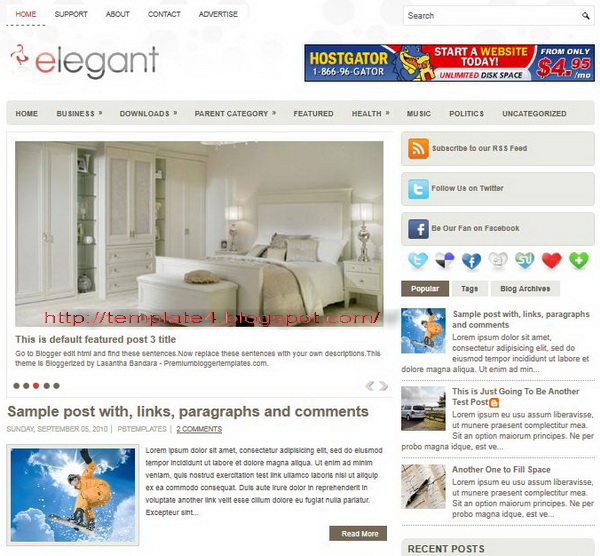
| Name: | Elegant |
| Platform: | Blogger / Blogspot |
| Coder/Designer: | Lasantha Bandara / Free WordPress Themes |
| Coder/Designer URL: | http://www.premiumbloggertemplates.com/ , http://fthemes.com/ |
| Description: | Elegant is a free Blogger template that is an adaptation of the Wordpress, |
| it's a premium elegant magazine style with 1 Sidebar, 2 Column, 3 Column footer, Blue and white color background, featured section, fixed width, header banner ads, page navigation, right sidebar, rounded corners, slider, social bookmark, twitter ready, tabbed widget, top navigation bar and Web 2.0. | |
| Theme Features: | - |
| Instructions: | Configure Featured Content Slider: |
| Login to your blogger dashboard--> layout- -> Edit HTML. Find <!-- Featured Content Slider Started -->. Now scroll down slowly and you can see each featured slider codes between <div class='fp-post'> and </div>. Now replace, "This is featured post X title" with your featured post title. "SLIDER-X-URL-HERE" with your featured post URL. Slider description with your slider description. Slider image with your slider image. For each featured slider. Configure Second Navigation Menu Find <div class='menu-secondary-wrap'> inside your template. (using CTRL+F). You can see like this code (partly): Change the name "Business, Internet, Market" and so on if you want. Replace "#" mark with the URL you want to go when click on the name Note : You do not need to change "Home" URL, because it is automatically linked to your homepage. Change Tab Names of Tab Widget: If you want to change your tab names of your tab widget then find this: Now change the names "Populars", "Tags" and "Blog Archives" as you like. Add a Header Logo: You can add a header logo for this template easily in the "Page Elements" section (Blogger Default Method). Logo image size must be 246px width and 60px height. | |
| Compatible: | |
| Tags: | 1 Sidebar, 2 Column, 3 column footer, Adapted from Wordpress, Ads Ready, Blogger, Blue, Elegant, Featured Section, Fixed Width, Magazine, Page Navigation, Premium, Right Sidebar, Slider, Social Bookmark, Tabber, Twitter Ready, Web 2.0, White, Widget Ready |

| Name: | Rock Area |
| Platform: | Blogger / Blogspot |
| Coder/Designer: | IWANKITTY (http://www.twitter.com/Rocksoundcore) |
| Coder/Designer URL: | http://twitter.com/iwankkitty |
| Description: | Rock Area is a free Blogger template that is Music Magazine style, |
| with 1 Right Sidebar, 2 Column, Black and white background color, Featured Section, Fixed width, Slider and more. | |
| Theme Features: | - |
| Instructions: | - |
| Compatible: | |
| Tags: | 1 Sidebar, 2 Column, 3 column, black, Blogger, Featured Section, Fixed Width, Gallery, Magazine, Right Sidebar, Slider, Social Bookmark, Twitter Ready, White, Widget Ready |

| Name: | Margo |
| Platform: | Blogger / Blogspot |
| Coder/Designer: | Lasantha Bandara / Free WordPress Themes |
| Coder/Designer URL: | http://www.premiumbloggertemplates.com/ , http://fthemes.com/ |
| Description: | Margo is a free Blogger template that is an adaptation of the Wordpress, |
| it's a premium elegant magazine style with 1 sidebar, 2 column, 3 column footer, grey and white color background, featured section, fixed width, header banner ads, right sidebar, slider, social bookmark, tabbed widget, Twitter ready, top navigation bar and Web 2.0. | |
| Theme Features: | - |
| Instructions: | Configure Featured Content Slider: |
| Login to your blogger dashboard--> layout- -> Edit HTML. Find <!-- Featured Content Slider Started -->. Now scroll down slowly and you can see each featured slider codes between <div class='fp-post'> and </div>. Now replace, "This is featured post X title" with your featured post title. "SLIDER-X-URL-HERE" with your featured post URL. Slider description with your slider description. Slider image with your slider image. For each featured slider. Change Tab Names of Tab Widget: If you want to change your tab names of your tab widget then find this: Now change the names "Populars", "Tags" and "Blog Archives" as you like. Add a Header Logo: You can add a header logo for this template easily in the "Page Elements" section (Blogger Default Method). Logo image size must be 208px width and 60px height. | |
| Compatible: | |
| Tags: | 1 Sidebar, 2 Column, 3 column footer, Adapted from Wordpress, Ads Ready, Blogger, Elegant, Featured Section, Fixed Width, Grey, Magazine, Page Navigation, Premium, Right Sidebar, Slider, Social Bookmark, Tabber, Twitter Ready, White, Widget Ready |


 Posts
Posts



